2005-10-20

What SciFi/Fantasy character are you?

Which Fantasy/SciFi Character Are You? What sort of Sci-fi/Fantasy character am I? Well I never really thought about it much. Spock (Star Trek) is a little cold but I admire him immensely. Q (Star Trek) became a better character as the various series rolled by. I could also identify with anything that was trying to kill the Voyager crew (Star Trek) - I wanted them all dead too. I also admire Avon (Blakes 7) for his sarcasm and cold heartedness. I love the shepherd (shepard) character on Firefly and Captain Mal also has a very interesting mix of morals. Prince (Lexx) is a very neat villain. And after taking the test, yes I definitely admire the mysterious Kosh (Babylon 5) character, but I don't really think that reflects me.

Thinking about it carefully, and looking through lists of science fiction movies and series ... there aren't really that many characters that stick out in my mind as being someone who I would want to be like. Is this a shortfall on the part of the sci-fi writers. They generate characters who are basically the same, may have a flaw or two, some sort of signature personality traits then try to make them good. The most interesting characters turn out to be the villains. The heroes are just doing what they have to do to maintain the status quo.

2005-10-15

iPod Nano and iTunes

You've probably heard at least some of the hype about the iPod Nano, very small, very light, feature-full little beasty. Exceedingly popular, with the whole of Hong Kong seemingly sold out as soon as they got them for at least one month after the iPod Nano debut. Joy. Well yes, the iPod Nano is all that but this device can also keep you slim and help you run faster and further. "Yeah right." you say. Well in my case at least, this is what I am seeing happen. I really didn't think I was going to get the Nano, but the idea kept creeping into my head that it was a very cool thing to have AND that if I got one then I would run every day for > 30mins. So I made a deal with myself that this would indeed be the case. So far so good. I also noticed that I run the entire loop faster while listening to music. I don't particularly know why, perhaps the music is distraction from the pain. I am not sure that ignoring pain is a good thing as your body probably has a good reason to try and slow you down with pain. I know that I used to ignore pain when swimming and would often stop, and suddenly realise that I had over done the exercise, and have to rush off to chuck up. No hurling with the iPod so far tho. We'll see what happens.

The iPod came with USB cable, the iPod, earphones, two pairs of earphone covers, some Apple stickers, CD of software, misc bits of paper, and a tiny slip of a manual that gives the barest operating essentials.

The software to talk to the iPod is iTunes (OSX & Windows). The iPod came with a CD containing iTunes 4.5, which after installing, wanted to upgrade to version 5, and then the next day version 6 was released ... another upgrade.

iTunes has a lot going for it, but it also has so much crap that I want to punch the designer in the face very hard.

I like the 5 star rating system. Genre is a good idea although some songs can belong to a couple genres ... I don't really use genre much anyway. Create a couple playlists and you can get around that problem. I created a playlist called "Up" and "Mellow" which allows me to suit my mood.

Copying of music to iTunes file structure sounds nice, but duplicates your music files. Sure I could have removed the originals ... but what perversion does iTunes perform on my files, and I like my music in my current folder structure, I don't really want Apple's idea of a folder structure imposed on me. Fortunately you can tell iTunes NOT to do this.

iTunes doesn't understand when you re-import a whole folder that you might have the same file appearing twice. So if I import "As Is - Ani Difranco.mp3", give it a rating, play it, etc, then I import the exact same file (from the same folder/name) I get another reference in iTunes. iTunes does not understand that both references it has in its listing are pointing to the exact same file. Stupidity. You can ask iTunes to show the duplicates and manually delete the doubles, but what a pain. I am sure there is a script out there that will do it for you.

There is a lot of complaining on the forums about all sorts of things, but one item that seemed to concern a number of people is that if you are a one computer family and have multiple iPods then you're in a spot of bother, you have to keep all the songs together and manually update your iPod. No way to have multiple libraries and auto-synching ... as far as I can tell.

I love podcasts, particularly as my favourite informative radio station "Radio National" keeps all the good programs as podcasts. Rocking very much! There are so many free podcasts that you can spend a good deal of time just listening to whatever it is that interests you. iTunes to subscribe to these podcasts very easily. Then whenever you plug your iPod in to charge via the USB cable, iTunes starts up, it will download the latest podcasts and update your iPod with them. Yeah!
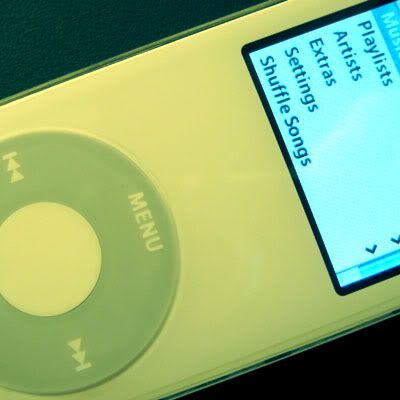
Image hosted by Photobucket.comSeems everyone gets the urge to have their own podcast ... so there are a lot of podcasts available that are just people with opinions talking. Hmmm. You know how most opinionated people should shut the hell up ... well podcasts are an outlet for them. Kinda like blogs. Oh. Hell. Well there are plenty of excellent commercial and independant podcasts that are well worth listening to. Check out the top 50.

I pretty quickly encountered a problem with the podcast files. I didn't want all the podcasts on my iPod, but I did want to keep them on my computer and in iTunes. How do I delete them off the iPod while keeping them in iTunes. Sounded simple enough. I though the tick boxes next to the name on the libraries list would do it, and although it doesn't work by default, this is exactly what you neeed to do.

I downloaded a "The Stanford Soundtrack", over 70 tracks free. 40 were crap. But the deal is that it is my first iTunes music download. Nice. iTunes made a nice playlist. I went through, listened to them all, ticked five of them as pod-worthy then cleared the 40 that weren't worth keeping on the hard drive. The problem is that I cleared them from the play list, but this did NOT delete them from the system, I had to delete them from the library. Bugger.

Delete music from your iPod

To delete music from your iPod Nano while keeping it in your iTunes list AND not having to do everything manually (drag and drop), you can tell iTunes to "Only sync checked items" by clicking on your iPod under "DEVICES" and ticking the checkbox "Only sync checked items". Which means if the little check box is NOT ticked then the song will be removed from your iPod. You have to do this for both music and podcasts or itunes will copy the podcasts anyway. Then Sync (see below)

Alternatively, you can click on the iPod name under "Devices" then click on the "Music" tab. Then select which Playlists you want on your ipod. I use this method, having the playlists "My Top Rated" and "Recently Added" checked. "My Top Rated" is a smart playlist with everything I rate 4 stars or more which presumes that you have gone through iTunes and rated at least your favourite songs. Then Sync (see below)

If you go the "Only synch checked items" route then a quick and easy way to select songs is to sort by your rating (in the left panel, under LIBRARY click on "Music", then to sort click on the column title "My Rating") and tick all of the rating 4 and rating 5 songs (to quickly check all the boxes you can click on the first song, scroll down, then hold down the shift key, click on the last song, release the shift key, then right-click (or Ctrl+Click) on any selected song and from the menu that will pop up you click on "Check Selection"). This assumes you have taken the time to go through your collection and rate everything; which is well worth your time, use the software to its max and you will get the most out of it.

Note that checking a song will not automatically place it on the iPod straight away, you either have to (A) Under "DEVICES" right click on the iPod and select "Sync" (B) from the top menu click "File" then click "Sync 'iPod'" (C) eject the iPod, disconnect the iPod, reconnect the iPod.

Unchecking items has some effects on how iTunes operates: the unchecked music isn't played on the computer when you run playlists. Also the unchecked music will not be burned when you want to create a CD from a play list. So you have to temporarily check them, burn, then uncheck. That really sucks. Apple have OVERLOADED the check box functionality. Bad coding, BAD! There should at least be a different copy-to-iPod check box.

iTunes needs a symbol under the tickbox like a 4 state symbol or colour system:
Green: on the iPod and you want it there
Yellow: not on the ipod yet but you want it there
Red: on the iPod but you don't want it there
Black: not on the iPod and you don't want it there

Frozen iPod

My iPod froze! I think it was because I switched it off during a slide show, or while it was displaying a single picture then I plugged in the USB, the picture popped up and that was it, frozen, bugger. The shutdown (hold play down) didn't work, but a quick search revealed the fix: hold the middle button and menu button.

my main iTunes gripes

* Duplicates music files into iTunes folders unless you're careful
* Doesn't allow for multiple active iPods for different users
* Can have duplicate references to the same music file
* Awkward config to remove files from your iPod and keep them on your PC
* Delete music from a play list should ask you if you want to completely delete the file ... perhaps. Not sure about that one.
* Unchecked files do not play and are not burned from play lists.

Still early days, but I really do like the iPod Nano, and I have to agree with Michael Blankenberg that iTunes is probably one of the best music players out there.

2005-10-05

Buying a camera

Say you're going overseas for a trip and stopping in Hong Kong or Singapore for a night and you think that this might be a good opportunity to buy a camera. Good idea! You can save yourself a couple hundred dollars and get all the extra wotsits for your camera in one go. Mind you, if you are after a cheap camera then you aren't going to save that much ... and maybe you are better off buying locally.

Know what you want BEFORE you go. Figure out what you want in a camera, and eventually the exact brand and model you want. Tour the local camera shop. Have a list of prices written down! If you are already overseas and have no idea about cameras/prices then talk to sales people in a couple stores and note down the model numbers and the prices, then find an internet cafe and explore DPReview for people's thought on the camera, reviews and most importantly - the USA street price. Convert the price to your currency and the currency of the country that you intend to purchase in. You should be able to check your local stores via the internet. Usually there are at least one or two search engines that will scan for prices in a number of shops, see what bargains you can get locally. Check eBay, the Buy-It-Now prices are a good guide. Have this list of prices written on paper, print outs from a store's web site are good too, but a list of prices and places for the camera you are after works really well. Wave it in the sales person's face. Say things like "aw, for only $50 more I could buy it at home and have local support if something goes wrong and I would be supporting a local business too ... can you throw in a 1Gig memory card / bag at that price?" Trust me, you will be more confident and happier with your purchase after checking that you are getting a good deal.

Don't buy from the airport. Duty free in the international airport in your own country might offer reasonable value (like Brisbane International Airport is actually OK). However the airport in Hong Kong is rubbish, do not buy there; the guys won't haggle and the prices are nothing special at all. Singapore seemed to be better than Hong Kong, but the bargains are always in the city. If you are only in transit through the city then these airport stores are a huge temptation. Don't do it!

Hong Kong airport to the city. If you are in Hong Kong for 4 hours or more then you can easily catch the train in, browse and buy then train back quite quickly and cheaply. Make sure you grab a map of the city on your way to the train which stops inside the airport. Take your luggage to the Kowloon station, this train station has flight check-in facilities so your luggage is all shipped back to the airport and you are issued with your seat! You can then drop off your hand luggage with the good people at the information desk (for a small fee) so you can head into the city unencumbered. The train takes about 20 minutes and I think costs about $20 for a return (same-day) trip. Buses from the station to the city central head in and out very regularly and can be free if you're sneaky about jumping on a bus to a respectable hotel in the heart of HK or you can hire a cab for a few dollars. There are plenty of places to buy stuff, and eat. There are also wonderful little back allies full of hard sellers of fakes, worth a look just for the experience; make sure you know how to haggle!

Don't buy from the first camera store. These camera stores usually try to rip people off by selling for at least RRP (recommended retail price), usually to people who are in a hurry and don't know the going price. Most of these guys will do that, so don't feel bad about talking to them about the camera, what models they think compare to that camera, options for the camera etc and then walking out if you are not sure. You are not wasting their time, you are making sure YOU are getting what you want. I find that I know when I have a good deal by the really good feeling I get about the sales guy, the deal and the camera. If you only have a couple hours then you will have to march around a bit, but purchasing a camera doesn't take long and sometimes a couple hundred meters walk can save you a couple hundred dollars.

Don't fall for the sales tricks. Always have an exit strategy: "OK, I am going to check out some other stores and may be back". Don't fall for "this price is only for right now/tonight", the proper reply to that is "Oh! I will be back when it comes down then". Don't fall for "oh, we don't have that one in stock but we have this better one". Some sales people will have all the camera settings reduced to produce crap images in the hopes you buy a more expensive camera. Sometimes they will claim they don't have the camera you want AFTER you have handed your credit card over and that for only a few more $ you can get this better brand/model; make sure they have the camera IN STOCK before start the payment process. Ask to see it working. Make sure they have NO opportunity to swap the camera after you have tested it. Don't fall for the no-name brand 24 Megapixel camera that is really on 3 Megapixel but is interpolated. Don't fall for the substitute brand, eg "Oh Rectalis is actually a rebadged Minolta". However you DO get different local names, like the Canon IXUS 750 is the same camera as Canon IXY 700, and Canon Powershot SD550. Bloody Canon.

Warranty! International warranty is what you want. Some cameras will have local country warranty only. Having said that, I have never had camera equipment break down on me. Mainly because I don't buy Sony crap. So, for me, warranty is not that important and I can save a couple hundred dollars - should I need warranty then I have to send the thing back to Hong Kong which doesn't bother me.

Extra bits! Lenses, filters, memory cards, camera bag, tripod, spare battery. If you are buying one of the amazing digital cameras with detachable lenses then you are really going to have to hunt around for a good shop that sells lenses at a reasonable price. Filters are an excellent way to protect your main lense on the larger cameras, get a nice neutral density filter and it will take the damage/scrapes instead of the lense. Memory cards are cheap everywhere, no need to buy a big one overseas unless you can get them to include it in the price - a haggling tool, make sure you know your local price as there is usually very little margin on memory, they won't be cheaper in Hong Kong. Always get some sort of bag, even if it is just a slip for your pocket size camera. Scratching the LCD panel sucks. Spare batteries may be a good idea, particularly if your camera chews through the battery. If you can take 150+ pics on one battery charge then you should be alright, but spare charged batteries offer a nice security against missing the key shots. Tripods aren't something that you want to carry around with you everywhere unless you are really keen but everyone should note that keeping the camera steady would cure a LOT of blur shots and resting your arms or camera against something helps heaps.

Finally, don't be afraid to not purchase anything. If you can't find a good bargain, then just hold off and buy off eBay or your local camera store. It may cost a little more but it is better to feel safe and happy about your purchase rather than just purchase something because it is there.


Also check out:
Buying a camera
Photo printing
Camera Comparison
DPReview
Lunar photography

2005-09-14

Photoshop

Image hosted by Photobucket.comAs a long time user of photoshop and similar programs (gimp, iphoto, paintshop pro, photoplus etc) I have to say that I spend way too much time editing images. Somehow I have so much fun when altering people's faces and scenes. From subtle lighting elements through to changing the landscape; got a road: change it to grass; powerlines become blue sky; acne is a thing of the past. Sure, the finished product isn't the original image, but I feel that I have contributed to the final output in an artistic sense. So I have made my friends look like aliens, removed hair, added hair, removed creases and spots from scanned photographs, highlighted the hidden subject of an image, blurred, removed and altered junk elements. As far as I am concerned, it is all good.

So when I see something cool done with photoshop, I have to wonder how they did it, and sometimes I attempt to replicate the feat. Hence my headless image on the right here was a picture by Josa Jr that was highlighted in Narbenfarkle's blog. Mine isn't anywhere near as good but it is simply a proof of concept for me. Two images, one of you and then another of the garment you are wearing in the same lighting situation. The garment solo is the toughest as you have to have the shirt open up to get the back but without your hands in shot. This would be easier if you have some sort of frame to stick under the shirt - which I wasn't about to do at this stage. Slap both images into Photoshop, select and copy the inside of your shirt and paste onto the other image then carefully erase the shirt insides so it fits around the neck area. Voila!

The pic to the right was easier because I don't look into the shirt. Just two pics. One with you in it, one without. You have to use a tripod (or similar). Open both images into photoshop. Copy and paste the image with you in it on the image without you, then erase away the head bit. You may have some issues with lighting, but this is quite simple to fix. Nice and quick and kinda funky looking.

I highly recommend that anyone with a digitial camera have a look at some of the good books written on editing images, specifically those books that list problems and solutions are the ones that I find best (if you are just beginning then you will want to hunt around for texts that are appropriate for your level).

2005-09-12

Bad Science

Ben Goldacre's web site Bad Science has some wonderfully insightful essays on science in the media and the abuse of science by irresponsible researchers. I'd write more but I would just be repeating Ben's stuff and you could already be there reading right now. So scoot! There is a lot to read. You may want to get a cup of nice tea first or warm milk. Mmmm, polyphenols and tryptophan.

2005-09-01

Serenity

This is the movie you were looking for ... when you went to see star wars. Exceedingly entertaining and should put a whole horde of people onto the Firefly series that got stopped because marketing screwed up.

Go see it ... when it comes out at the end of September 2005. So very highly recommended.

2005-08-05

Consumables (ink, toner, bulbs)

A couple years ago I had wanted to do some printing at home and found that my Canon BJ-30 had bitten the dust. Sad. I never really used the printer much but when I had it always produced crisp pages. The cost of ink really hurt though, which soon found me with alternate brands and refill kits. Seems that a lot of the ink from refills would end up over my fingers. That wasn't too bad because the ink was water soluble. Too bad if you got a couple drops of water on your document; smears and runs.

The problem is that the cost per page for inkjet printing is very high. Fortunately the cost of small laser printers had plummeted. I investigated the various printers in my price range then went out and bought a Lexmark E210. The cost per page is about 5 cents. Compared to the 25 cents per page I was paying for the old Canon. Modern printers are even MORE expensive per page, with colour prints around 75 cents per print for Canon (90+ cents for Kodak, Sony, Olympus, 50 cents for HP and Epson).

The downside to the little laser is that it is all black and white. Which actually is fine by me. If I want a print that bad then I can go to OfficeWorks, BigW or KMart and get one for 20 to 30 cents - and I don't have to buy any hardware.

My laser at 5 cents per page is looking pretty damned fine. Well after about a year and a half the toner ran low. Obviously I don't print that much. So I hunted around for the replacement toner.

When I was purchasing my laser printer I asked for the costs of consumables. The evil Harvey Norman salesman said the toner cartridges cost around $70. When I asked for two he ummmmd and arrrrd and claimed they were out of stock. I thought nothing more of it. But when it came time for me to get a new toner cartridge I find they are priced $110-$150. If I had known at the time that the salesman was lieing then I think I would have punched him in the face and left the store. Well. Maybe not, but sales tactics like this really really suck. I have encountered it before. The place I work for wanted a new data projector, so I purchased a one from a company and they stated that the bulbs would cost $200. One year later the bulbs cost $700. Another salesman told me that this was a standard tactic at the time. Well data projectors were getting popular and we required two more. This time, however, I ordered 4 spare bulbs. The salesman was desperately trying to talk me out of it, saying they would deteriorate over time, the warranty would expire (as if they EVER put warranty on bulbs). I had my way though, got the bulbs and, as it turned out, saved a couple thousand dollars. Of course, NOW they charge full price on the bulbs straight away.

So I hunted around for the best price for a replacement toner cartridge. I also wanted the toner straight away because I wanted to do some printing that evening. So cheap and in stock. I checked EBay for a ball park price and then I phoned about 12 companies. One company, Trendsetta Media, claimed that they made the cartridges themselves, but it would take a day to get it from their warehouse. Apparently everyone uses the same warehouse in Brisbane and nobody wants to carry stock. Bastards. The last two comapnies I checked actually had the cartridge on the shelf; Harvey Norman for $149 and the small place across the road from me - Cartridge World, a remanufactured cartridge for $78. Woohoo! That's 3 cents per page! How freakin' happy was I? Plugged in the toner and now I am printing new crisp pages!

There are a lot of other brand laser printers for under $300. I highly recommend having a look and if you will probably save a bundle.

Books Read 2025

Below are the books that I read during 2025 and my rating out of 5. Rating Title Author Book# 5 Flybot Dennis E. Taylor - 5 Here One Moment ...