2006-07-08

Refresh Finder Plug-in AppleScript

Refresh for OS X FinderI find there are plenty of annoyances with Finder, which is the very limited file browser that comes with OS X. I have already mentioned the bug about changing the colour of the background in a previous post. There are far more usability issues I have with Finder that I ever had with Windows Explorer (or File Manager).

One issue that I have contended with recently was finding "Refresh", the equivalent to Windows F5. I had software generating output and was watching in Finder to see how large the output file was over time. You can Ctrl-Click and select "Get Info" but the one tap function key for refresh does not seem to be available.

After some browsing I found a nice script offered by Eric "Heavyboots" which I reproduce below. His suggestion was to save as an executable apple script app, but I have gone one further and placed the script directly into an Automator plug-in.

Automator > Library(Automator) > Action(Run AppleScript)
tell application "Finder"
tell front window
update every item with necessity
end tell
end tell
File > Save As Plugin >
Save Plug-in As: Refresh
Plug-in for: Finder

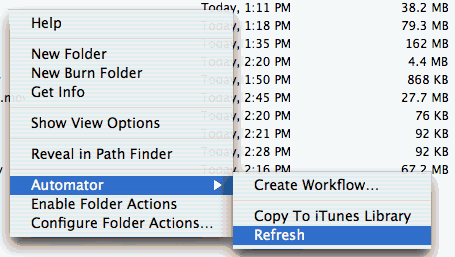
Now when you want to refresh in finder you can right click (Ctrl+Click) anywhere (so far as I have tested) in Finder:
Finder > Right Click > Automator > Refresh

Path Finder has solved nearly all of these problems, however it is quite crashy on my system; so much so that it is really cheesing me off to the point where I often just use the basic OS X finder because I need something to work right away. Consequently, when I had a refresh issue with Finder ... I considered using Path Finder only for a second or two before I decided to continue with Finder. Path Finder has its own list of bugs but the added functionality is excellent. Once they iron out the crashing, and get some of the silly errors out of the software I will highly recommend Path Finder as a complete replacement for finder. But definitely not now (July 2006).

2006-06-21

Automating iSight

Photobucket - Video and Image HostingSo you have this iSight camera built into your Mac and you want to make it take images on demand. My first thought was to get Automator to do it all, however Automator does not have access to the camera at this stage. As soon as Automator has a camera action then the task will become much more simple and you can toss out the mess of scripting below.

What follows is a number of experiments to take capture iSight images at set times. The methods use a neat piece of software from Axel Bauer at intergalactic. The software is run from the command line (universal binary) and allows you to take a picture as long as the camera is working and not in use.

Experimenting with AppleScript

I created a folder called /Applications/snapme where I placed all the script files, including Axel's isightcapture program. After looking around I noted an example script in AppleScript which I decided to improve upon. Thanks to some excellent tips from Michael Henley who pointed me at the shell script reference for AppleScript.
Applicactions : AppleScript : Script Editor
-- filename /Applications/snapme/snapme.once
do shell script "/Applications/snapme/isightcapture ${HOME}/Pictures/snap.`date '+%y%m%d.%H%M%S'`.jpg"

Shell script

Another option is to create a shell script with the following code. Save it as text if you are using text edit ("Format", "Make Plain Text").

I used the console program called pico to edit the script and saved it as /Applications/snapme/snapme
Terminal : pico /Applications/snapme/snapme
# filename /Applications/snapme/snapme
# returns image path+name or error
# use the isightcapture software from
# http://www.intergalactic.de/hacks.html
# to save an isight pic to the pictures folder
myimg=${HOME}/Pictures/snapme
# make the folder if it does not exist
if [ ! -d $myimg ]
then
mkdir "$myimg"
fi
# add date+jpg onto the path
myimg=${myimg}/`date "+%y%m%d.%H%M%S"`.jpg
# capture the image to the specified path/filname
/Applications/snapme/isightcapture $myimg
# test if parameter quiet in which case - echo nothing
if [ ! "$1" = "quiet" ]
then
# test if file created
if [ -f $myimg ]
then
# cp $myimg /var/www/webcam
echo $myimg
else
# file was not created
echo "error"
fi
fi
unset myimg
Remember to open a terminal session and chmod the saved shell script file so you can execute it. You may have to rename snapme.txt to snapme if you used TextEditor.
Terminal : command prompt
chmod 755 /Applications/snapme/snapme
I also placed a link in the path so I could run it from anywhere on the command line. You don't need to do this for Automator to work. But if you want to type "snapme" at the terminal prompt then this is one way to set up.
Terminal : command prompt
cd /bin
sudo ln -s /Applications/snapme/snapme
We can alter our AppleScript file to run this shell script, with the added benefit that the AppleScript now knows the name of the file produced and is able to further manipulate it should you wish to.
Applicactions : AppleScript : Script Editor
-- filename /Applications/snapme/snapme.once
-- The command below runs isightcapture prog directly with options
-- do shell script "/Applications/snapme/isightcapture ${HOME}/Pictures/snapme/`date '+%y%m%d.%H%M%S'`.jpg"
-- The command below runs the shell script "snapme"
set myImg to do shell script "/Applications/snapme/snapme"
We can also use Automator to create an app to run the shell script.
Applications : Automator
"Run Shell Script"
/Applications/snapme/snapme
Save as App called "snapme" {.app} in the /Applications/snapme folder. You should now be able to click on the snapme app and have a pic saved in your pictures folder with date-time in the name. You can alter the shell script above to change the destination path and/or the output filename.

Note that you can tell AppleScript to create an application under "File", "Save As". Change the "File Format:" to "application", untick "Startup Screen" and tick "Run Only".

cron

After a security update, cron was unable to run a shell script calling isightcapture properly - the captured image fails to be written. However, you can create a cron job to run an applescript app which issues the isightcapture shell command (such as snapme.once above). You could also try Lingon to run the script via launchd.

cron is a *nix command that can schedule repeated program calls for you. This is all very advanced so proceed with caution, chance to mess your system up is quite high. We want cron to run our shell script at specified times. First let us examine the cron command.
crontab -l
lists the cron jobs
crontab -r
removes all cron jobs
contab -e
edits cron jobs

cron file format
min hr day month dayOfWeek program
0-59 0-23 1-31 1-12 0-6(0=Sunday)
example:
20 1 * * * /Applications/snapme/snapme.once.app
run every morning at 1:20am
0 2 1 * * /Applications/snapme/snapme.once.app
run every morning at 2:00am on the 1st of day of every month
0,15,30,45 9-18 * * * /Applications/snapme/snapme.once.app
run every 15 minutes from 9am to 5:45pm
Note that if cron receives output from the script then it will email that output to you.

In OS X, "crontab -e" will invoke the text editor known as vi which is really not the editor of choice for most Mac users. vi is hard core.
Terminal : command prompt
crontab -e
Here's the few simple commands you want: tap "A" to get into insert mode, edit your text with only one of the crontab entries such as
0,15,30,45 * * * *  /Applications/snapme/snapme.once.app
then tap "ESC" to get out of insert mode.

WARNING: if you have that really cool speech recognition app going you are going to have to shut it down to stop it from absorbing the ESC char on you.

Type ":wq" and tap enter which will write and quit.

More
There is a lot of complicated scripting going on here. I am assuming a level of competence that you really shouldn't have to have.

Also check out Undercover, Prey and KeyCamX which does the whole thing for you and more. Check Timmargh for a slick way to script isight.

Hope someone finds some of this useful. Ah well, it was fun trying it out.

2006-06-18

Switching to Mac

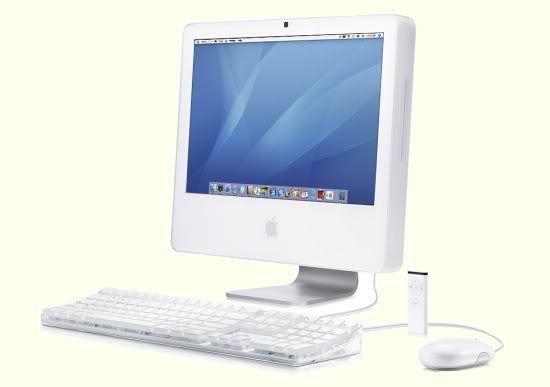
Photobucket - Video and Image HostingThanks to putting in a tonne of overtime hours for a particular project, they agreed to fund my purchase of any equipment that I might need for home use. Hurrah! I suggested and have received a sweet 20inch Intel Core Duo iMac. Which explains the lack of pretty much everything else that I have been doing lately. The shipment was delayed a couple times, the people at Infinite Systems were quite good about it and kept me updated - I tried not to contact them too often as there were deadlines that would preclude any lustful fawning of a new computer. The last delay was the iMac missing the plane to Australia (dopey Mac) and so arrived late on a Friday afternoon. The store was good enough to contact me about the iMac's delivery and gave me the choice of picking up the system that afternoon or waiting for it to be delivered on Monday. What choice was that?! I will pick it up! The service guy was installing the extra RAM when I arrived and whatever other voodoo they have to perform prior to release. Then it was mine! All mine! Much bigger than I thought it would be, and heavier. But then this is no laptop - this is a full on desktop with a honking big screen. Quite a simple matter of loading the box into the back of my Jazz and buzzing home. Setup was a breeze; one power cable, plug in keyboard and mouse. OK, I might have had a little problem finding the power button, thankfully Donna spotted it very quickly. Surprisingly little documentation for a computer, operating system and all the bundled goodies found in the included iLife package. First app executed was Garage Band. Glee! Donna and I rapidly put together a slick sounding podcast ... light on the content, but fun to make. Check out Front Row movie trailers, then I get down to the task of Boot Camping.
Photobucket - Video and Image HostingHaving had a much older G3 iMac for some time now, I am not completely a newbie to the OS X world. I had OS 9 upgraded to OS X (10.3) on this old computer and noted the improved performance. Even though the old iMac was operating below 400MHz, the system speed is more than adequate to operate as a slick web browser.

The Intel iMac operates VERY much faster. After messing around with some of the neat features of Front-Row and iLife, I decided to forsake my old Microsoft Windows AMD 2200 and cart everything over on the iMac. Sweet joy!

This journey of "switching" systems has not been without some pitfalls and hiccups.

Run Microsoft Windows on an Apple Mac
I would not really have made this journey if I was forced to forsake the Microsoft Windows environment completely. Fortunately with the new Intel based Apple computers, you can install and run Windows software. Currently this is via one of two methods: Boot Camp which allows you to boot the computer into Microsoft Windows or Apple OS X. Alternatively you can purchase Parallels which will allow you to run Microsoft Windows within an Apple OS X window; quite efficiently. I have setup both and have been quite surprised how quick and easy it is. Note that you will have to have a licensed copy of Microsoft Windows to do this (you can't use Dell branded OEM Windows, so I hear). I also recommend setting up VirtueDesktops so you can put Microsoft Windows on another desktop and jump between your main OS X screen and the Parallels Microsoft Windows Screen. Slick!

iLife
All Apple computers come with iLife '06 which contains so many goodies that I will just have to direct you to the Apple page to show you what can be done. Software to help you make music, design web pages, edit and share photos, edit video, create DVDs, purchase and play music. Simple (ish) and so very much fun++. As previously stated, I have already created a podcast file and will host it somewhere for people to check out. I will be co-opting some of you in for future productions.

I had some trouble with Garage Band, the audio that I recorded suddenly became corrupted, unsure what I did but problem was something to do with moving/resizing a track and/or exporting. The sound became all digitally bubbly stuttering. Frustrating. The podcast was still moderately OK and I released a sample to friends. Not completely satisfied I started to explore the file system and found that Garage Band creates a folder for each of its projects. Inside the folder are several other folders and I managed to locate the aif audio file of the original recording. I simply reimported that file into the podcast and the sound was repaired - hurrah. All of this had to be done in Terminal using unix commands such as "cd", "ls" and "mv". Fine for me as I grew up with this stuff, but pity the poor ma & pa with a Mac as their first computer trying to figure that out; let's hope they never need to.

FireWire is hot!
I don't know what Apple does with FireWire but DAMN it is very fast. In theory USB-2 should be better at 480Mbits/sec compared to 400Mbits/sec of IEEE-1394 (FireWire) but I seem to actually get the full 50 Megabytes a second on my Vantec hard drive enclosure where as Windows seems lucky to get 10 Megabytes per second sometimes. Not that I have officially timed any of this, but the difference is obvious to me; FireWire is much faster.

Just cool
Tap F12 and you are in Widget world, go install some more.
Tap F9 and Expose shows you all the software you have open at a glance.
Cmd+Opt+8 turn on the zoom; Cmd+Opt+= zoom in; Cmd+Opt+- zoom out; Cmd+Opt+Ctrl+8 invert screen colours
Find heaps of other keyboard shortcuts by install the xcuts widget.
Front row turns your Mac into a media centre of sorts; a great way to navigate media, browse movie trailers.
Automator scripting is very cool indeed once you figure your way around; simplifying mundane tasks very quickly.
Speech recognition is awesome; I wasted most of a day playing with this.
Not for everyone but Terminal connects via SSH so easily to my Linux machines.
Spell check seems to be everywhere, even in web forms.
Apache web server built in, "System Preferences" -> "Sharing" and tick "Personal Web Sharing".
Built-in firewall.

Office
Yes, you can go out and buy Microsoft Office for Mac, but it isn't Unisversal, however Rosetta does quite a good job and runs the PPC version at a reasonable pace. A demo version of MS Office was already installed on the iMac and it operated quite slickly. You could also just use Office for Windows in a Parallels window running Microsoft Windows. Or you can investigate the alternatives that Apple provide such as iWork or the free Open Office. I have yet to settle on what to do here, I will definitely try Open Office but I am not enamoured of the X11 interface.

Screen issues
I am having some problems with my screen. It is only minor at this stage, and apparently pretty much isolated to me as I can't find anyone else on the net having the same issues. Apple have been very helpful and are eager to investigate / fix / replace, but I want to give this machine a little more time to burn in before I send the thing off for repairs.

Dodgy USB interfacing
This is an OS X problem as far as I can tell. I have heaps of drives that I plug into my iMac, generally everything works fine but every now and again I will have issues where OS X will disconnect the drive for no particular reason while copying, will mess up folder names on FAT partitions in Finder but not on the actual drive (reboot solves). But it all works smoothly when I am in WinXP under boot camp.

Colours not sticking
I can assign folders different colours for the background in Finder, but my Applications folder changes the colour to something else every fricken time. Honestly this is a pretty basic function of OS X, I would have thought this would be running smoothly.

Speech/Speakable Items commands going nuts
I love Speakable Items. If you add an item that you do not want you can manually remove the file using finder by going to the /Library/Speech/SpeakableItems folder. In the "Commands" section under "Application Switching" the "Quit from ..." and "Switch to ..." items list has a huge number of duplicates on my setup that is getting larger every time I speak to my Mac.

Finder errors
Apart from the USB issues and colour problems, occasionally in columns view when I scroll around, the graphics offset for one or more of the columns appears to get out of step with itself. I can see two folders of the same name, I click on one and it will change its name to what it should have been.

Wireless Network
My wireless network functions quite well for the five systems that access it. However the iMac refused to connect even though it could see it. Eventually I found an option screen which allowed me to tell the iMac to not be so fussy and it connected up straight away. When I got organised enough to write down my set up routine ... I could no longer find the option. Damnit. So the tip for people who are having troubles is : look elsewhere (the menu bar, system preferences, internet connect. The network socket connected instantly.

Safari don't like this page
Very very few times a page will not load correctly in Safari. I would say it is about the same as Firefox. Otherwise - I really do like Safari and am currently using it as my browser of choice. Maybe I will load Firefox later when the next version comes out. I miss AdBlock.

Printing
I have a awesome Lexmark E230 hanging off a Windows XP Home machine in my computer room. OS X has the right printer driver, sees the shared printer but comes up with "NT_STATUS_ACCESS_DENIED" when you explore around system preferences. There are a number of web pages with useless information telling you to hold down Alt/Option when in the (non-existent) Printer Centre to get an advanced option; but these web pages neglect to tell you specifics and are worse than completely useless. Fortunately Scott Hurring gives quite a good guide to get things going. To add a little to the frustration I was using Windows XP Home on my printer server, I had to add a new user with password (not admin) to allow my Mac to connect to the printer.

The printer setup should have been MUCH easier to do, and apparently is intended to be so, however the installation process is quite broken. Grrrrrrr!

Hangs
Oh yes, don't believe the hype; OS X does hang. Only three times for me so far, and I have to point out that I am truly messing with the system here. Once when BackupList was using rsync to copy about 16Gig to my firewire drive, once when I somehow accidentally opened all my bookmarks in Safari while it was loading a huge complex web page, and one time where I wasn't doing anything in particular. No mouse movement, so I just held down the power button until the system switched off. The restart took ages, so I am assuming that there is some sort of repair/integrity checking going on.

Nagware
One of the programs below (I suspect VirtueDesktops or Adium) keeps trying to install "Smart Crash Reports" nearly every time I boot up, and even tho it has a "Don't Ask Me Again" checkbox that I tick every time, it keeps fricken' asking me. I will never ever install this software because of that. I sent an email of displeasure to the punks that wrote "Smart Crash Reports", but have not yet received any reply.

Overall
I would say that OS X feels like Windows 95 did when I was exploring it in the early days. Very cool interface but niggling problems abound. Again this is only because I run around exploring all these things. I'm sure the normal user just sits back and uses the common items without any problems. But then wouldn't they do that in Windows XP too? Don't get me wrong, I'm here to stay, it is just that I am not going to fool myself into thinking this is all fairy land perfect.

Other OS X software I found useful
Virtue Desktop lets you create multiple desktops and change between them
Parallels run Microsoft Windows while running OS X
BootCamp boot into windows or OS X
Amadeus Audio edit audio files
Adium Chat instant messaging chat client
DivX 1.0.1 convert and view DivX video
GimpShop free powerful image editing software
iStatPro nifty informational widget
CoreDuoTemp how hot is the CPU running
Chicken of the VNC connect to other computer screens
Skype chat with voice over the net
StuffIt expand ZIP files (etc)
VLC view video files
Command line isight software, for scripting
Widgets wikipedia, movie session times, etc etc
BackupList basic backup ... dodgy
TextWrangler cool code editor
Cyberduck FTP client
2006-05-20

Flickr and Blogger

This is an example of clicking "Blog This" in Flickr and having it automatically create a blog entry in Blogger. This shows how services from Yahoo can integrate so smoothly with services from rival company: Google. A symbol of peace in our time.

So after configuring Flickr with my Blogger information, everything is all set to have my "Bribie Island Birds in Sunset" image splattered up in an article. Flickr has a free account that limits you to uploading 20Meg of photos per month and only the last 200 will be shown in your library, which should be plenty for the casual blogger esp if you are clever about resizing your images to sensible dimensions (1280x960 is great, 800x600 is enough). Oh, and they say they may delete your account if it becomes inactive for 90 days; I have a regularly accessed Yahoo email account which is used as the login for Flickr so I think inactivity isn't going happen any time soon. You can pay a low yearly fee and you get way more upload, no expiry and a bunch of other features.

There is also this pretty cool flickr badge feature which is buried deep in the help. Flick badge lets you create html code, or a flash object that you put into your blog template or on any old page really. The badge displays is quite configurable and will display images from your flickr site or everybody's.

I'm sure there are a bunch of other features in Flickr that I am missing but for me at the moment, this is quite enough to recommend the service. Hopefully Yahoo can continue to pay the exceedingly large bandwidth bill for Flickr and not pass it on to us free account holders but I imagine there will come a time where we have to decide if we want to register or cancel.

Flickr is a pretty good way to get your images on display.

So now I have tested blogging directly from Digg, Picassa, Photobucket and now Flickr. Woohoo! The whole world is gearing up to let me create pointless articles that you never wanted to read. Sweeeeet.

2006-05-15

Linux

Photobucket - Video and Image HostingLinux is an alternative operating system for your computer. This means that you can start Linux instead of Windows. Why would you want to do that? Well many reasons, the major one being that Linux is free. Other reasons include: Linux claims to be more secure, more stable, more open (you can download the source code for the operating system), less resource intensive; as a method to recover/inspect/hack your Windows installation; to run an alternative configuration to be more anonymous on the internet; to avoid Windows spyware and viruses; sticking it to "The Man"; to be part of something community driven rather than corporate driven; to increase your respect amongst the nerds; to see what the fuss is about; to expand your knowledge of computers and operating systems. And so on. If you are getting a new computer then why not put Linux on the old system, see how it works.

Unfortunately Microsoft Windows programs don't run under Linux, solutions include:
* Find equivalent software for Linux (usually free)
* Install Windows in a seperate partition on your computer and "dual boot"
* Install a virtual machine to run Windows at the same time as Linux (VMWare, Parallels)
* Install a windows API emulator in Linux (WINE)

HELP. The online Linux community is excellent, there is plenty of help about for Linux users scattered all over the internet. Check out Linux Questions. I would also recommend getting into IRC using one of the instant messaging clients installed in Linux and after connecting to an IRC server you would join the channel of your distribution name (eg: /join #slackware), you should get very quick responses from the people online. Also check Low Fat Linux, Linux command line,

GET LINUX. Usually your ISP will have an ftp site that should contain a number of Linux distributions that you should be able to download without affecting your download quota if you have one, otherwise you will often find various Linux distributions on a CD stuck to the front of computer magazines or you can download them directly from their respective home sites. Downloading an ISO from the internet means that you are going to have to burn that ISO image to a CD using your CD burning software (like Nero).

There are many different types of Linux being developed by different organisations. Check out Wikipedia Linux Comparison. Apart from installing on your computer you can use special "Live" CDs, which means that you can run Linux from the CD without having to use any hard drive space on your computer (notably Knoppix), but CDs are much slower than your hard drive so you don't get the real feel of speed at all, particularly laptops which tend to have very slow CD drives.
UBUNTU is excellent even tho it uses the much derided gnome windows manager. A single slick CD to install all the good bits, could have been prettier, but better than most.

Like most Linux installations that I have tried, Ubuntu detected nearly all the devices on the old laptop (850MHz Celeron) and runs reasonably well in only 64Meg of RAM. Wouldn't find my external mouse, stuck with the scratch pad, can't easily configure the xorg.conf for the device.

Check out this Ubuntu for Novices

On my HP e-Vectra: Takes quite a while to install on a P3-600 128Meg RAM. Runs reasonably, even when the resolution is 1400x900. Nice and slick speed. Sound works well. Has GAIM XChat GIMP GnomeTorrent OpenOffice.
KNOPPIX runs well as a Live CD but there isn’t an obvious way to install it on the HDD (although I have done this). Laptop CD drives tend to be slow so I got bored of it real quick. Google about if you want the guide to installing Knoppix on a HDD.
SUSE Never did the full SUSE. Not for mere mortals I think, as it wanted all 4 CDs and I was not prepared to download the later ones for a Linux that has such a crappy installation process.
SIMPLY MEPIS (Debian based) Installs nicely, just like Knoppix it can run in live mode, but unlike Knoppix, it has a neat Install icon on the desktop in the live version to put the whole OS onto the hard drive.

Mepis has issues with a text mode when booting and SCAN for video mode seems to have killed my machine. Just pick a number and everything goes fine. It detects both my mice (unlike Ubuntu). Defaults to KDE desktop. Has Azuereus built in. Open Office etc. More tools and utilities than Ubuntu. Mepis is more techie aimed I think. Runs like a rocket.

In 800x600 you run into problems, you should configure the task bar to be on the side, be custom width 128pix wide and to disappear after 1 sec.

Still uses XFree86 and not Xorg! Feels faster than Ubuntu, unsure why.
SLACKWARE - my distrbution of choice for my little server. Is NOT for the simple installation crew. This is the Linux I use when I pretend to be hard core. No graphic interface for me! Pixels are for pansies. Runs like a rocket on my 300MHz Celeron 128Meg RAM machine. Excellent for web services, small database engine etc.

I have a bunch of notes that I use to configure Slackware that I think would be of help to other who attempt to use this distribution. I would NOT recommend slackware for people who don't want to get involved in the low level functioning of their computer.
XANDROS Excellent simple installation. OS is good too. KDE I think but no Konqueror! No XChat, no bit torrent - all of which can be downloaded - but mepis already has it. Detects both my mice. Doesn't look like there is an option for external monitor tho. Still seems to come with all the usual basics and a couple extras like Skype, PalmOS tools, real media can be played from within web. Really good control panel. Good file manager. Pretty slick package.

On my HP e-Vectra: takes a while to install and seemingly forever to boot up for the first time. Memory hungry. Everything takes a long time to load.
MANDRIVA / MANDRAKE is quite good for the beginner. Although it has at least 3 CDs, it never seemed to ask me for more than the first one.

2006-05-10

Caring government gives tax break to needy rich

Image stolen and edited from http://www.theepochtimes.com/news/5-11-28/35086.html If this is not OK just let me know and I will remove it - I couldn't find an email address for Torsten Blackwood/AFP/Getty. Mind you, this is heavily edited by me.For too long the rich have suffered at the hands of the poor, but oh how the tables are turning now. Take that you evil poor people. Draining valuable money from the coffers of the wealthy for petty things like food, rent, health and education while the rich go without a luxury yacht, second holiday home and ivory back scratchers. Don't you people realise that spoiled snotty kids are extremely demanding?! Plastic surgery isn't getting any cheaper either, and have you seen cocaine prices lately? It's insane.

The Prime Minister says about the budget "One of the best ways to help people with high petrol prices is to put money in their pockets." Which means the wealthy can keep guzzling fuel via their oversized four wheel drive vehicles while the poor should stay at home, in their own suburbs, away from the wealthy people. $36 billion and major investment in roads and infrastructure so the wealthy have nice smooth roads to use their fuel upon.

Peter Costello, champion of the rich business man. Making it easier for them to fire poor people for no reason at all. Giving $37 billion to the few wealthy amounts to about $120/week. Imagine how the poor would waste $120 a week. They might get themselves educated, afford child care so they can work, get out of debt cycles and eventually not be poor anymore. Who will the wealthy oppress then?

Yes, I'm sure his tax break wins praise from the uber wealthy who run the media. The media are only too happy to roll over and report what their wealthy masters tell them to.

What can the small guy do? Aren't you glad you left your union? Aren't you glad you stopped going to church? These two institutions were the power house of social justice for the masses but you've deserted them and let yourselves down. The media played no small part in this, of course, paedophile priests, union bashing. What does the small guy want to do? Nothing. Apathy will drive this alleged democracy into the dictatorial realms we used to associate with juntas and communism. Your rights and lifestyle are being eroded and you simply shrug. As long as there is tv, footy and beer. The wealthy are organised, they have a plan and they are going to take you down and keep you there.

Check out News.com's calculations to see how well you do out of the pork barrelling.

2006-05-01

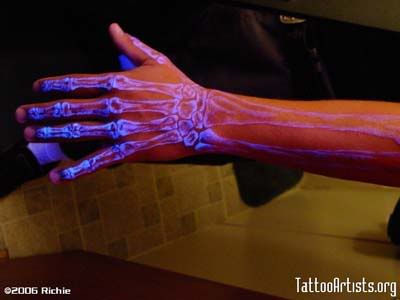
Ultraviolet Tattoo

Photobucket - Video and Image HostingNot that I want a tattoo particularly, but if I did then "Blacklight reactive ink" is what I would want it done in. Glows in UV light but is invisible in normal light! Apart from finding somebody local who actually does this, there would be the matter of picking the right design; Apple/IBM/Commodore logo, Quake logo, circuit diagram, Escher drawing, biohazard, radiation symbol, "THX1138", a barcode, "Property of Donna". There are all sorts of ideas for geeks and physics geeks.

Safety
Note that not all ultraviolet tattoo inks are equal, some cause nasty reactions so make sure you know exactly what inks the tattoo artist is going to use. Check out Tattoo Health and the PMMA products by BioMetrix/NewWest. And check out the general health issues with getting and maintaining your tattoo from the many sites out there.

Then I would have to go and buy a UV torch. While I was at "United Nuclear" I would just have to get a Geiger counter; a model that detects alpha, beta, gamma and Xrays. You know, so when society collapses after the USA sends its radioactive gifts of love to whatever country has resources that it wants, I can detect if it safe to go outside. Or breath. In the meantime, I could prove to myself that the microwave oven doesn't actually produce ionising radiation, and maybe neither does my mobile phone. Oh, the wireless network is suspect too. That glowing crap I'd like scratched into my skin. Monitors. The backyard. Water. The cat. Babies. Whatever.

Check the article at PostStar about UV tattoos.

Books Read 2025

Below are the books that I read during 2025 and my rating out of 5. Rating Title Author Book# 5 Flybot Dennis E. Taylor - 5 Here One Moment ...